
AI Prompt
Introduction
The AI Prompt node adds dynamic analysis and output by using LLMs. Analyze data and make context-aware decisions. It processes inputs from previous nodes (forms, CRM data, etc.) and returns structured outputs for tasks like lead scoring, smart routing, content personalization, and inquiry categorization—automating complex work that previously required manual review while maintaining a personalized touch.
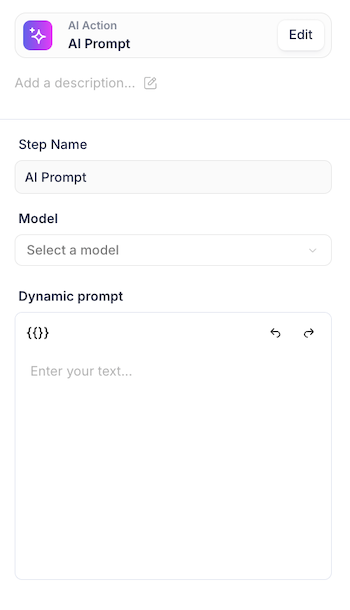
Step Name: A label to identify what this particular AI action does within your workflow.
Model: The specific AI model (like GPT-4o, GPT-4-turbo, or GPT-3.5-turbo) that will process your prompt.
GPT-4o: Best for tasks needing understanding or multiple input types, with fast performance.
GPT-4-turbo: Best for complex reasoning and coding tasks that need maximum intelligence.
GPT-3.5-turbo: Best for simple, repetitive tasks where speed matters.
Dynamic prompt: The instructions or text you want the AI to process, where {{}} brackets allow you to insert variables or data from previous workflow steps.
Output: When the node is connected a workflow you will be able to add its output into any relevant field downstream.
Clear, specific prompts are crucial for consistent AI outputs in automation workflows. Without explicit instructions, AI models may add unnecessary explanations, vary formatting, or include unwanted text that breaks downstream processes. Being strict about output format ensures your workflow runs reliably every time.
Example Prompt:
(This prompt takes a company name variable and outputs a formatted welcome message, or returns null if no valid company name is provided.)
You will receive a company name in the format {{company name}}.

Your task is to output ONLY the following string with the company name inserted:
"[COMPANY NAME] Welcome to Default!"

Rules:
- Replace [COMPANY NAME] with the exact company name provided
- Output ONLY this string, nothing else
- No explanations, no additional text
- If the company name is empty, undefined, null, or contains only whitespace, output exactly: null
- Do not use quotes around the final output

Example:
Input: {{company name}} = "Acme Corp"
Output: Acme Corp Welcome to Default!

Input: {{company name}} = ""
Output: null

Now process: {{company name}}
For best practice, consider using an LLM outside of Default (like ChatGPT or Claude) to help craft these strict, consistent prompts. You can describe your exact requirements and test various edge cases to ensure your prompt handles all scenarios properly before implementing it in your workflow. NOTE: Keep AI prompts themselves as concise as possible since they are costly in "time" in workflow processing.