
How to Bulk Sync Slack Channel IDs to Salesforce with Default
Use Case:
Automatically populate Salesforce Account records with their corresponding Slack channel IDs.
The Problem
Many B2B companies use Slack Connect channels to communicate with customers and internal channels to discuss accounts. But there's no easy way to link these channels to your CRM records.
What we wanted:
Store the External Slack Channel ID (customer-facing Slack Connect channels) on each Account
Store the Internal Slack Channel ID (internal team channels about that customer) on each Account
Do this for 500+ existing channels in bulk, then keep it updated going forward
The Solution Overview
We built a Default workflow that:
Receives channel data via webhook
Uses AI to parse the channel name into an Account name
Matches against Salesforce Account records
Updates the appropriate Slack Channel ID field
Notifies us of any unmatched channels for manual review
Then we wrote a simple Python script to send all existing channels through the workflow.
Result: 567 channels synced in under 30 seconds, with only ~35 needing manual matching.
Prerequisites
Default account with Salesforce integration connected
Slack Bot Token with
channels:readscopeTwo custom fields on your Salesforce Account object:
Internal_Slack_Channel_ID__cExternal_Slack_Channel_ID__c
Python 3 installed (for the bulk send script)
Step 1: Define Your Channel Naming Convention
Before building the workflow, document your Slack channel naming patterns. Ours were:
Channel Type | Naming Pattern | Example |
|---|---|---|
External (Slack Connect) |
|
|
Internal (Team channels) |
|
|
Prospects (Ignore) |
|
|
All other channels (Ignore) |
|
|
This consistency is key—the AI parser thrives with predictable patterns to extract Account names accurately.
Step 2: Export All Slack Channels
Slack's API limits results to 1,000 channels per request. We wrote a Python script with cursor-based pagination to fetch all channels:
#!/usr/bin/env python3
"""
Fetch all Slack channels using cursor-based pagination.
Requires SLACK_BOT_TOKEN environment variable to be set.
"""

import os
import requests
import csv
from time import sleep

SLACK_TOKEN = os.environ.get('SLACK_BOT_TOKEN')

def fetch_all_channels():
    url = "https://slack.com/api/conversations.list"
    headers = {"Authorization": f"Bearer {SLACK_TOKEN}"}

    all_channels = []
    cursor = None

    while True:
        params = {
            "types": "public_channel,private_channel",
            "limit": 1000,
            "exclude_archived": "true"
        }
        if cursor:
            params["cursor"] = cursor

        response = requests.get(url, headers=headers, params=params)
        data = response.json()

        channels = data.get("channels", [])
        all_channels.extend(channels)

        next_cursor = data.get("response_metadata", {}).get("next_cursor", "")
        if not next_cursor:
            break
        cursor = next_cursor
        sleep(0.5)

    return all_channels

# Save to CSV
channels = fetch_all_channels()
with open("all_slack_channels.csv", "w", newline="") as f:
    writer = csv.writer(f)
    writer.writerow(["Channel ID", "Channel Name"])
    for ch in channels:
        writer.writerow([ch["id"], ch["name"]])
Run it:
export SLACK_BOT_TOKEN="xoxb-your-token-here"
python3 fetch_all_slack_channels.py
This outputs all_slack_channels.csv with all your channel IDs and names.
Step 3: Build the Default Workflow
Create a new workflow in Default with the following structure:
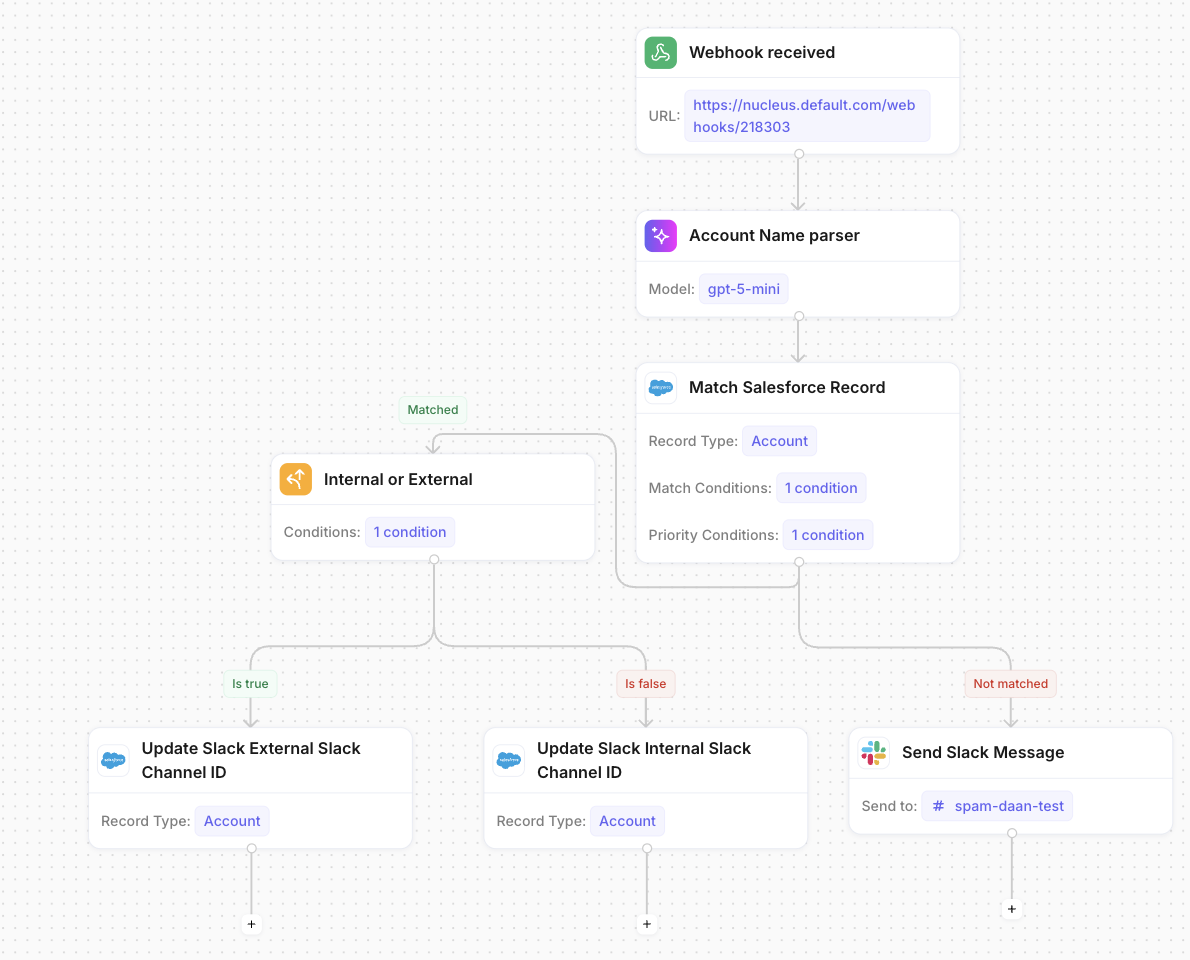
3.1 Webhook Trigger
Add a Webhook received trigger. This generates a unique URL that will receive channel data.
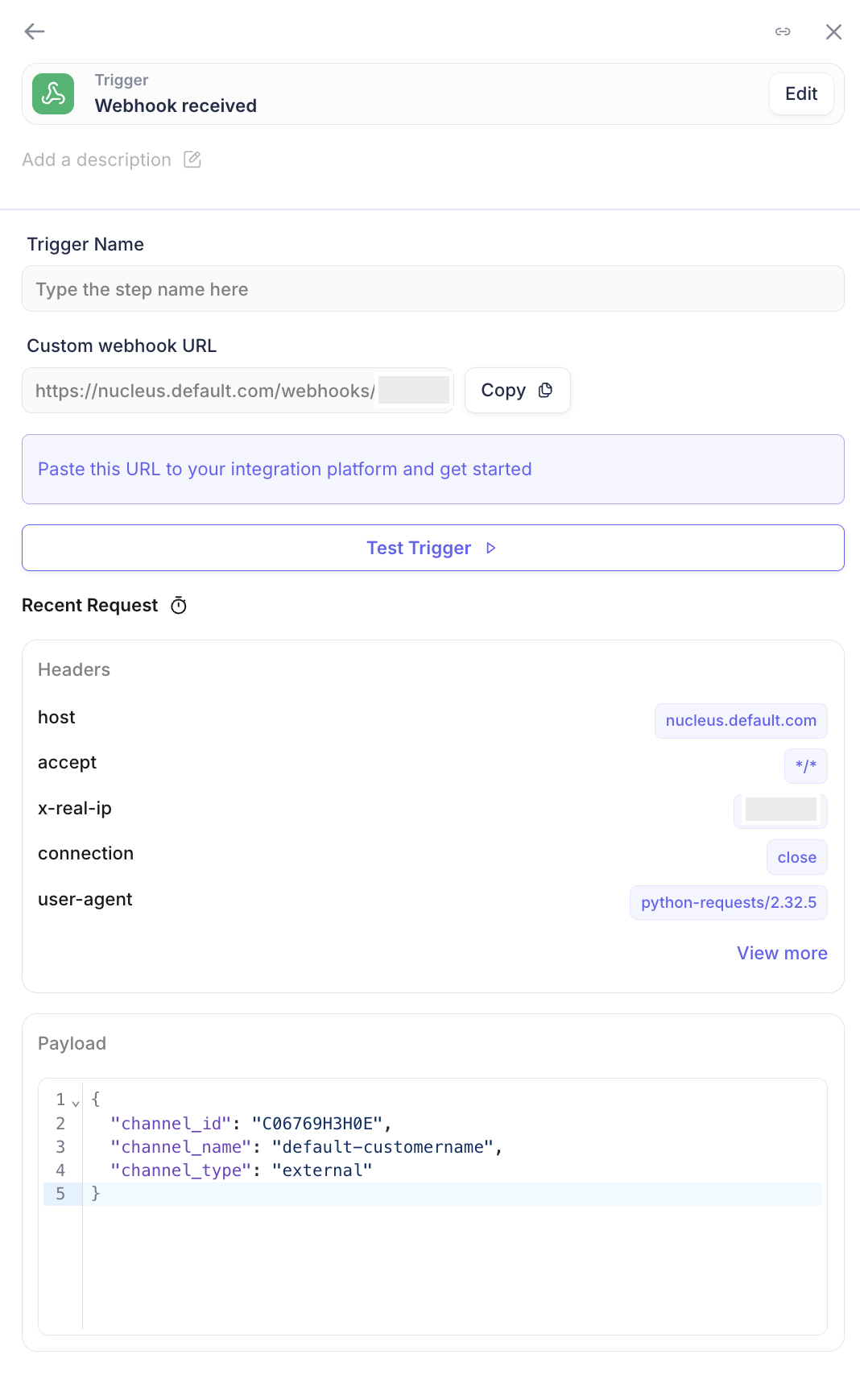
Expected payload structure:
{
    "channel_id": "C06769H3H0E",
    "channel_name": "default-customername",
    "channel_type": "external"
}
3.2 AI Prompt: Account Name Parser
Add an AI Prompt block to extract the Account name from the channel name.
Configuration:
Model:
gpt-4o-mini(fast and cost-effective)Step Name:
Account Name parser
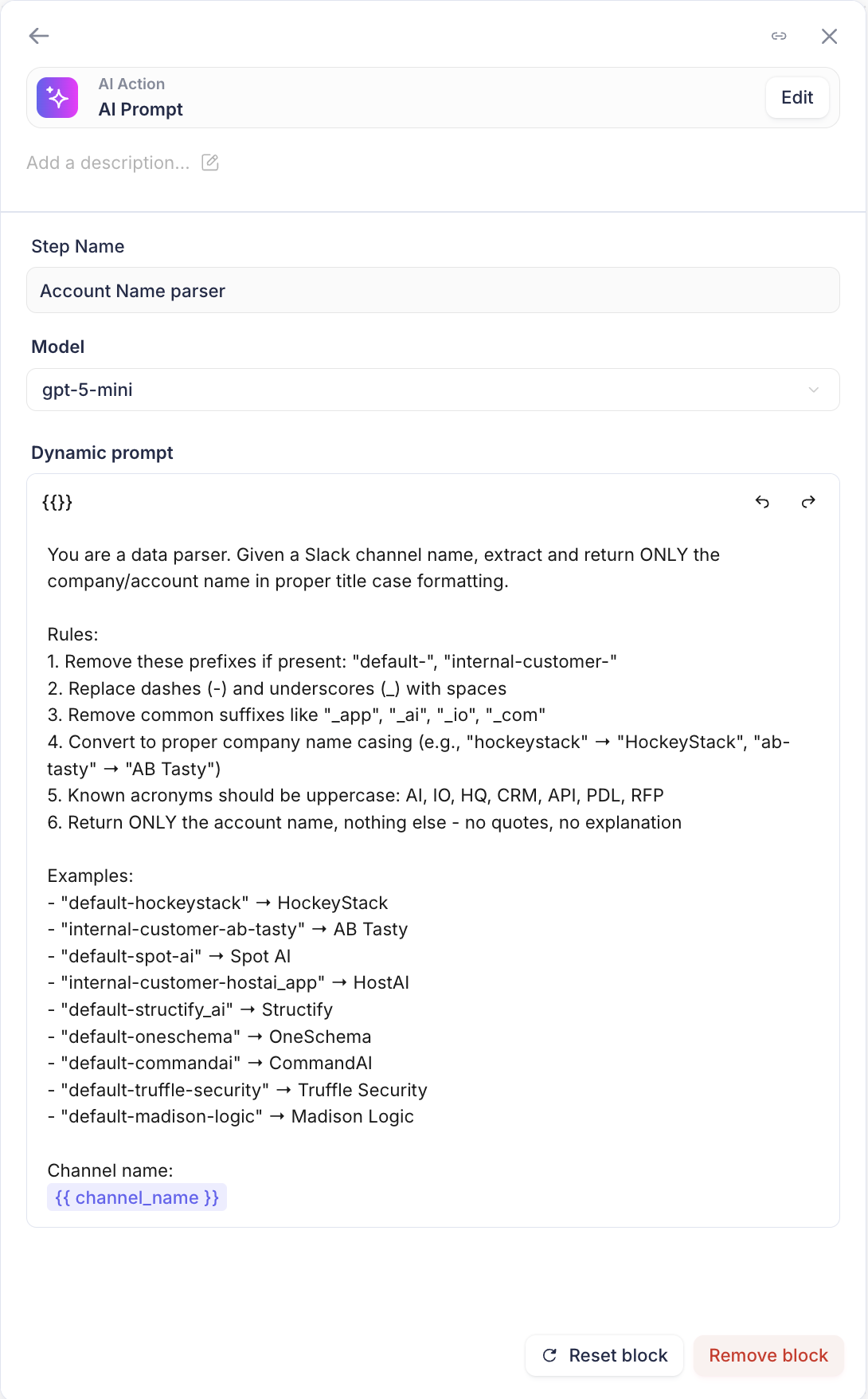
Prompt:
You are a data parser. Given a Slack channel name, extract and return ONLY the company/account name in proper title case formatting.

Rules:
1. Remove these prefixes if present: "default-", "internal-customer-"
2. Replace dashes (-) and underscores (_) with spaces
3. Remove common suffixes like "_app", "_ai", "_io", "_com"
4. Convert to proper company name casing (e.g., "customername" → "CustomerName", "customer-name" → "Customer Name")
5. Known acronyms should be uppercase: AI, IO, HQ, CRM, API, PDL, RFP
6. Return ONLY the account name, nothing else - no quotes, no explanation

Examples:
- "default-customername" → CustomerName
- "internal-customer-customer-name" → Customer Name
- "default-customer-name-ai" → Customer Name AI
- "internal-customer-customer-name_app" → Customer Name

Channel name: {{ channel_name }}
3.3 Match Salesforce Record
Add a Match Salesforce Record block to find the corresponding Account.
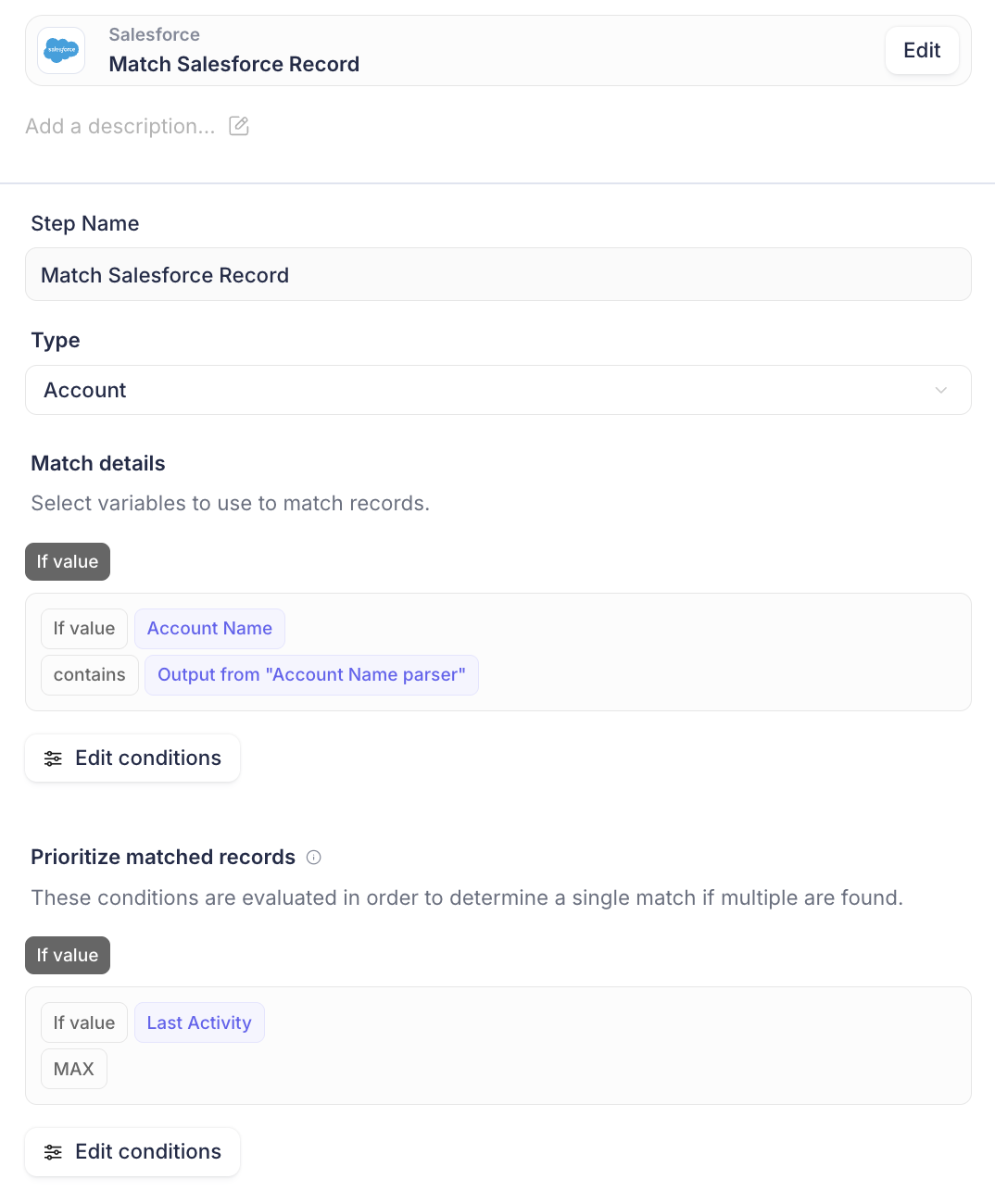
Configuration:
Type:
AccountMatch Condition:
Account NamecontainsOutput from "Account Name parser"Priority Condition:
Last Activity= MAX (picks the most recently active account if multiple matches)
3.4 If/Else: Internal or External
Add an If/Else block to route to the correct update action based on channel type.
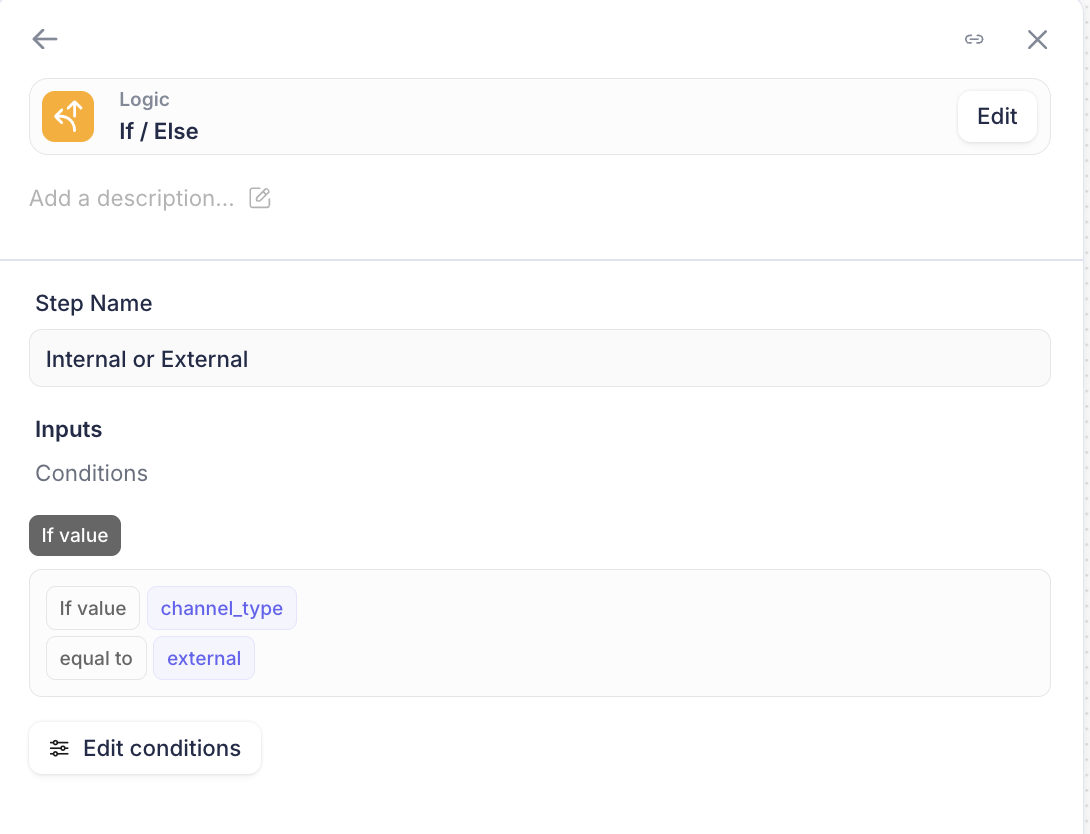
Condition:
If
channel_typeequal toexternal→ Update External Slack Channel IDElse → Update Internal Slack Channel ID
3.5 Update Salesforce Record (External)
For the "Is true" branch, add an Update Salesforce Record block:
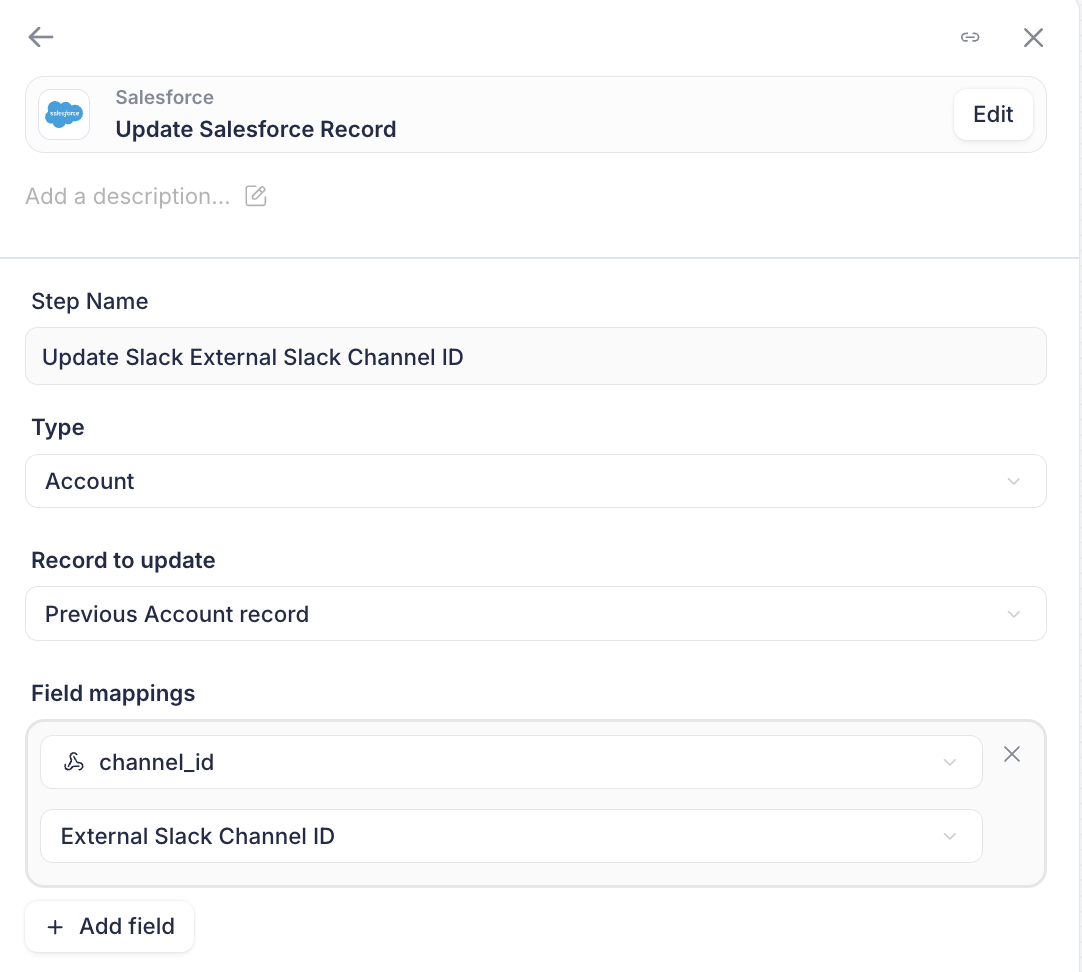
Configuration:
Type:
AccountRecord to update:
Previous Account recordField mapping:
channel_id→External Slack Channel ID
3.6 Update Salesforce Record (Internal)
For the "Is false" branch, add another Update Salesforce Record block:
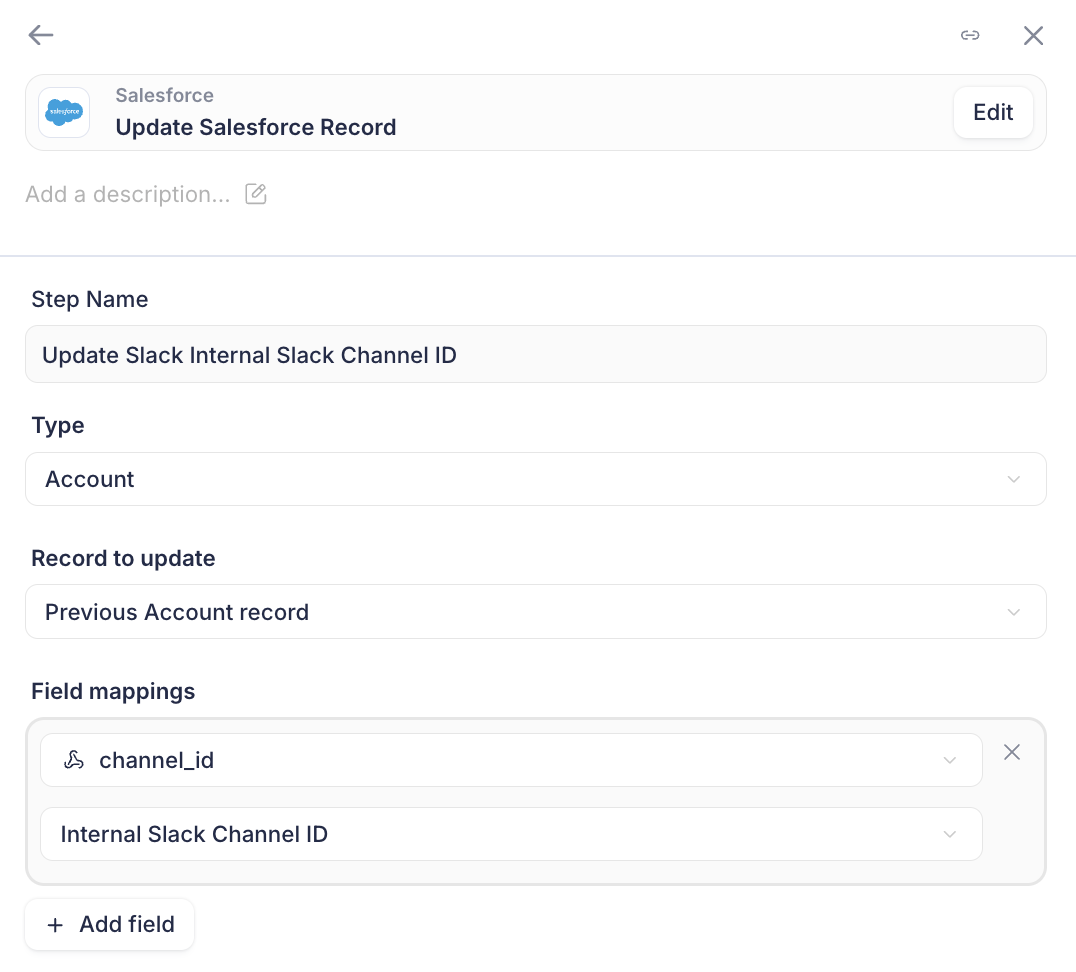
Configuration:
Type:
AccountRecord to update:
Previous Account recordField mapping:
channel_id→Internal Slack Channel ID
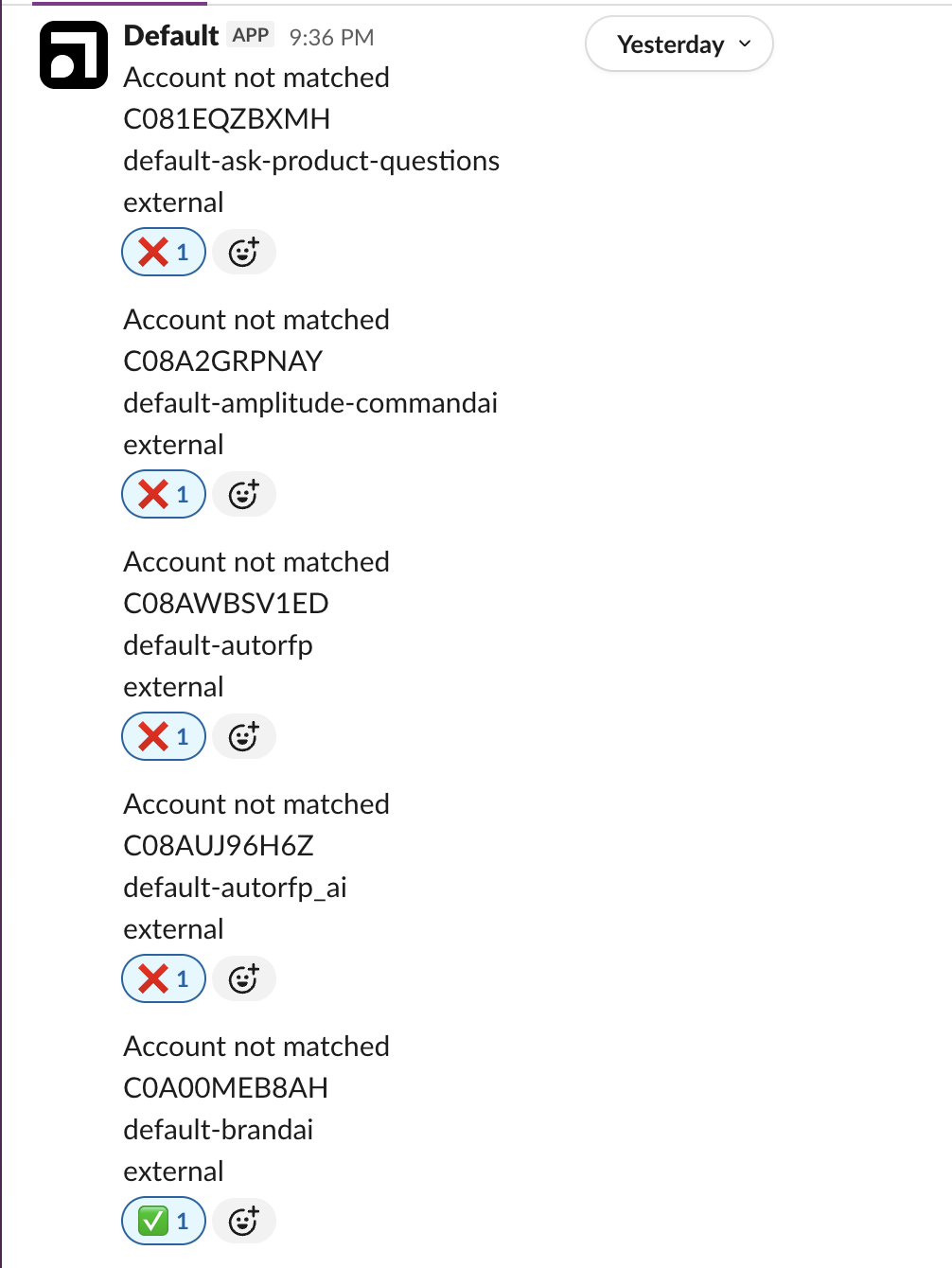
3.7 Send Slack Message (No Match)
For the "Not matched" branch from the Salesforce match step, add a Send Slack Message block to notify your team of channels that couldn't be auto-matched.
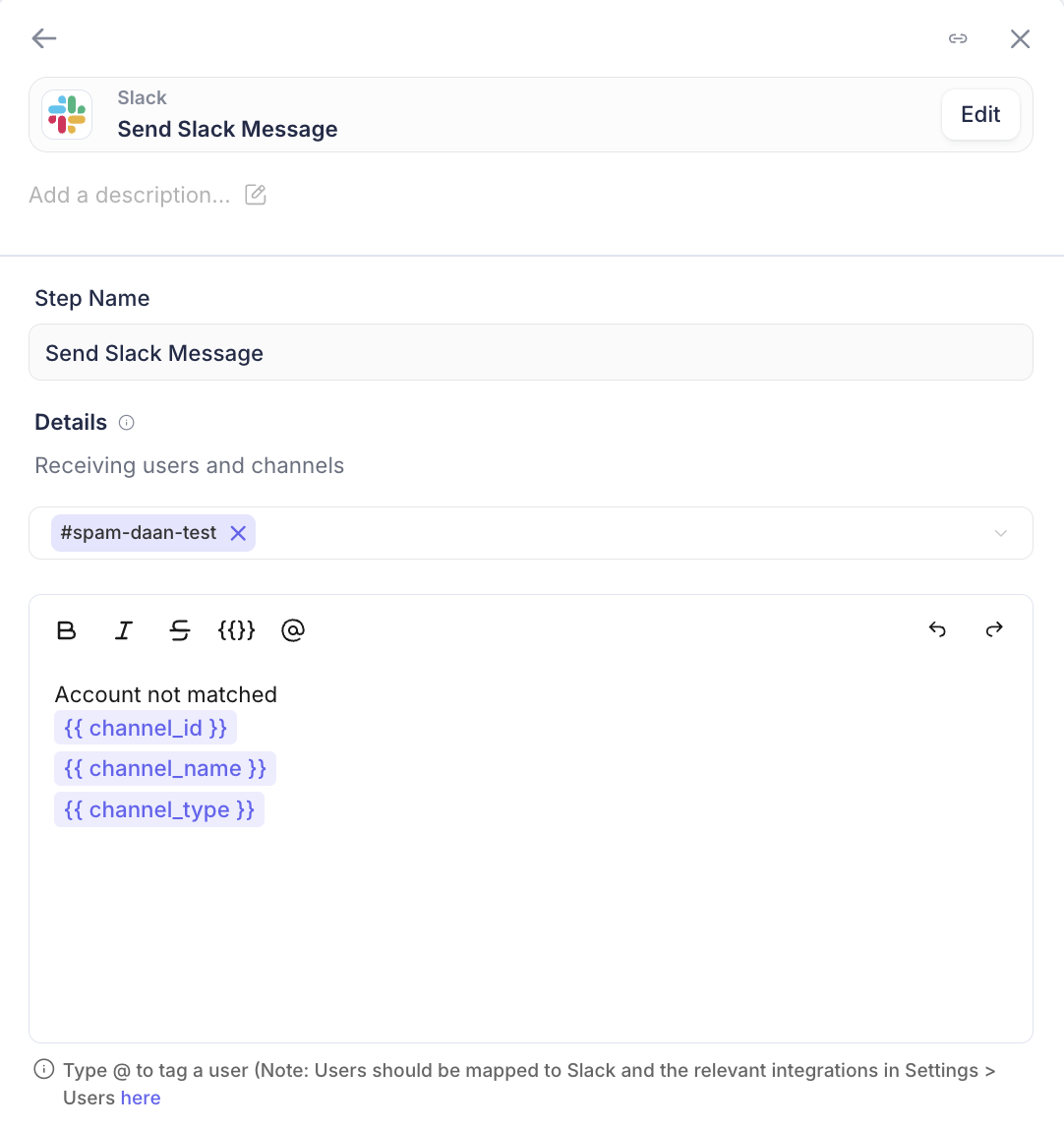
Configuration:
Send to: A designated channel (e.g.,
#ops-alerts)Message:
Account not matched
{{ channel_id }}

{{ channel_name }}

{{ channel_type }}
Step 4: Test the Workflow
Before bulk sending, test with a single channel using
?mode=teston your webhook URL:import requests WEBHOOK_URL = "https://nucleus.default.com/webhooks/YOUR_ID?mode=test" payload = { "channel_id": "C06769H3H0E", "channel_name": "default-customername", "channel_type": "external" } response = requests.post(WEBHOOK_URL, json=payload) print(response.status_code)Step 5: Bulk Send All Channels
Once tested, create a script to send all channels through the workflow:
#!/usr/bin/env python3
import csv
import requests
from concurrent.futures import ThreadPoolExecutor, as_completed

CSV_PATH = "all_slack_channels.csv"
WEBHOOK_URL = "https://nucleus.default.com/webhooks/YOUR_ID"
MAX_WORKERS = 10

def classify_channel(channel_name):
    """Return 'external', 'internal', or None (skip)."""
    if channel_name.startswith("internal-customer-"):
        return "internal"
    elif channel_name.startswith("default-"):
        return "external"
    return None

def send_to_webhook(channel):
    payload = {
        "channel_id": channel["id"],
        "channel_name": channel["name"],
        "channel_type": channel["type"]
    }
    response = requests.post(WEBHOOK_URL, json=payload, timeout=30)
    return response.ok

# Load and filter channels
channels = []
with open(CSV_PATH, 'r') as f:
    for row in csv.DictReader(f):
        channel_type = classify_channel(row['Channel Name'])
        if channel_type:
            channels.append({
                "id": row['Channel ID'],
                "name": row['Channel Name'],
                "type": channel_type
            })

print(f"Sending {len(channels)} channels...")

# Send in parallel
with ThreadPoolExecutor(max_workers=MAX_WORKERS) as executor:
    futures = [executor.submit(send_to_webhook, ch) for ch in channels]
    for i, future in enumerate(as_completed(futures), 1):
        if i % 50 == 0:
            print(f"Progress: {i}/{len(channels)}")

print("Done!")
Run it:
python3 bulk_send_channels.pyStep 6: Handle Unmatched Channels
Some channels won't match automatically due to:
Spelling differences between channel name and Account name
Channels for Accounts that don't exist in Salesforce
Test/internal channels that aren't real customers
You'll receive Slack notifications for these. Review each one and either:
Manually update the Salesforce Account with the channel ID
Ignore if it's not a real customer channel
Results
Metric | Count |
|---|---|
Total channels processed | 567 |
External channels synced | 367 |
Internal channels synced | 200 |
Auto-matched successfully | ~540 |
Required manual matching | ~25 |
Processing time | < 30 seconds |
Going Forward
All new channels created are being stored in the CRM:
When a kick off meeting is booked with customers we can automatically send notifications to internal channels and stamp CRM with kick off date.
Many more automated use cases are now unlocked: e.g. Pushing product usage information into internal channels, warning customers depending on their product usage in the external channel, alerts to customer channels for updates depending on their tier, and many more!